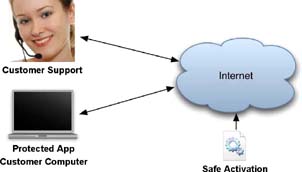
 LicenseSupport serves two roles:
LicenseSupport serves two roles:
Customer Support Tool
Safe Activation API
Safe Activation is an online activation service that works with software protection and licensing tools including QuickLicense, DocProtect and AppProtect.
LicenseSupport enables a customer support person to efficiently manage software licensing issues by phone, email or Internet. It allows applications or websites to share licensing information with the Safe Activation server, customers, resellers or affiliates.
This task-oriented tool prompts the sales or support person for the required information and generates a license code to support a customer by phone or email. With modest technical skills, the support person can provide an activation code, reset a license, extend a time-limited Trial or block an activated license before issuing a refund.
The support person can remotely reset or suspend a license, increase the allowed activations, change the subscripton license status or enable optional paid features in a license. The support person is modifying a specific customer license, logging their actions and not risking changes that could affect other users.
By integrating customer data, email support, license commands and historical logs, the LicenseSupport app can simplify the support process for a specific customer license based on the Serial Number.
Status flags, allowed activations, expiration date or optional features in a customer license can be remotely set, enabled or disabled. Read and write activation or order data.
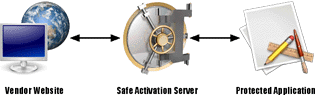 The Safe Activation programming interface can be used from a shopping cart running on a vendor web site. When processing a customer order, Serial Numbers can be securely retrieved, the allowed computer activation count can be set to match the ordered licenses and selected features in the license can be enabled in the activation server during the purchase process.
| Activate | Next Unused Serial Number | Add Serial Number |
| Delete Serial Number | License Status | Search Customer Records |
| Serial Number Data | Serial Number Option Set | Serial Number Option Clear |
| Change Max Activations | Suspend Request Number | Change Serial Number Date |
| Serial Number Note Read/Write | Serial Number Date Read/Write | Product Note Read/Write |
| Customer Field Read/Write | Transaction Read/Search | Remote Log |
| Customer Delete | Block List Delete | Feature Read/Write |
| Get SNs by Range or Group | Get Activated SNs for Email | Get Activated SNs for Product |
Customer accounts and support services running on a vendor web site can access or update real-time licensing data stored in the activation server. That data can be used by the protected application running on a customer computer. The QuickLicense runtime has a passthru command to securely send these API commands from a protected application.

|
Use LicenseSupport with:
 |